AI Video QC: The 12 Checks Every Video Should Pass Before the Client Sees It
A practical QC checklist for video agencies: captions, names, links, prices, dates, banned words, the brief, the hook, black frames, dead air, safe zones and licensing. Which ten AI can check today, and which two still need a person.



Before a client sees a cut, it should pass twelve checks: captions match the speech, nothing is misspelled, every name is spelled one way, links point to the right domain and can be typed, prices and dates hold up, no forbidden words, the brief's asks are in it at the right length, the hook starts on time, captions stay up long enough to read, there are no black frames or dead air at a sane loudness, the safe zones are clear, and every asset is licensed. Ten of those a machine can check reliably today. Two still need a person. Below is each one, why it matters, and who should catch it.
Here's why this list exists. Ask any agency owner which revision notes hurt most and it's rarely the creative ones. “Make the second half punchier” is a conversation. “You spelled our CEO's name wrong” is a trust problem, and it costs a round for something nobody should have had to point out. QC is about making sure the client's attention goes to the first kind of note.
The ten checks a machine should do
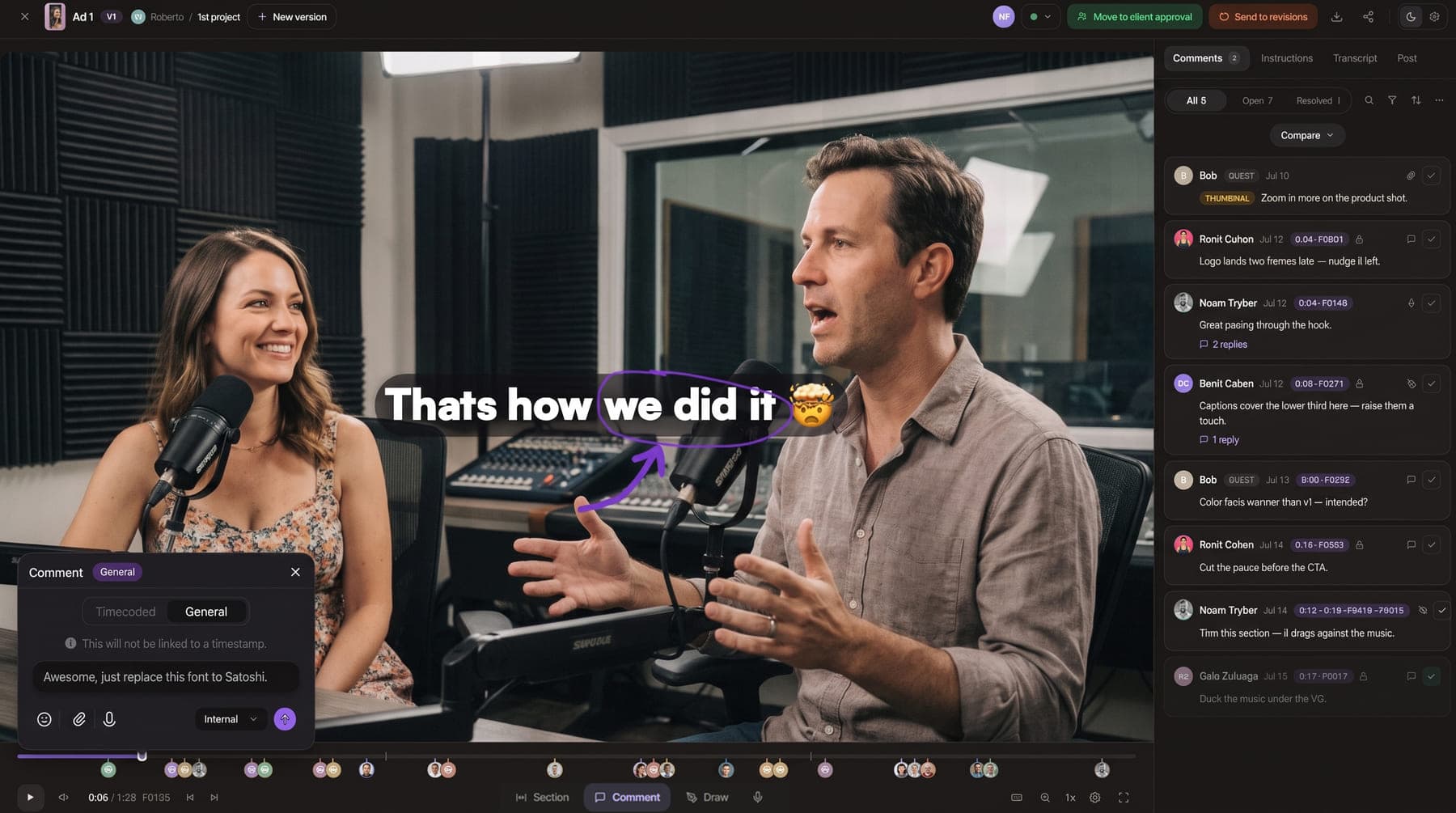
Each of these is a check Timeliner's AI QC runs on a version. Findings land as markers on the video timeline, next to your team's own comments, so the editor fixes them the same way they fix any note.
1. The captions say what the speaker says
Auto-captions mishear, editors retype, and a caption that says “15%” over a speaker saying “fifty percent” is a factual error with the client's name on it. Numbers matter most because they're the claims a client's legal team reads.
Who catches it: AI QC (“Caption doesn't match the speech” and “Wrong number in caption”).
2. Nothing on screen is misspelled
A typo is embarrassing rather than wrong, so it's graded as a warning, not an error. Still worth catching before the client does.
Who catches it: AI QC (“Caption spelling”).
3. Every name is spelled one way
The lower third says “Sara”, the end card says “Sarah”. Or the brand name is right in one place and hyphenated in another. The check compares names across the video and against how the brand says its names are spelled.
Who catches it: AI QC (“Name spelt two ways”).
4. Links point to the right place and can be typed
Two separate failures. The link is the wrong domain (an old site, a competitor's, a typo), or the link can't be typed at all: a space in the middle, a trailing full stop, an ending that isn't a real domain. Either one turns the call to action into a dead end.
Who catches it: AI QC (“Link doesn't match the brand” and “Link can't be typed”).
5. Prices and dates hold up
“$ 99” in one scene and “99$” in another reads sloppy. A date like 31/04 can't exist under either day-month or month-day reading, and that one is an error. Promotions are where these slip in, because they get edited at the last minute.
Who catches it: AI QC (“Price written inconsistently” and “Date that can't exist”).
6. No word the client forbids
Regulated clients (health, finance, supplements) usually have a list: no “cure”, no “guaranteed”, no “risk-free”. It applies to what's on screen and to what's spoken. This is the check that protects the client from themselves.
Who catches it: AI QC (“Word to avoid”).
7. The brief's asks are in the cut, at the right length
The brief said “mention the free consultation” and “45 seconds”. The cut is 62 seconds and doesn't mention it. The length check is deliberately soft (a note, not an issue), because a target pulled out of a brief is the least certain thing being measured.
Who catches it: AI QC (“Something the brief asked for” and “Length against the brief's target”).
8. The hook starts on time
If nobody speaks for the first few seconds of a short-form video, most viewers are gone before the point arrives. A long silent open can be a creative choice, which is why this is a warning and not an error.
Who catches it: AI QC (“Hook starts late”).
9. Captions stay up long enough to read
Fast-cut captions look energetic in the edit bay and are unreadable on a phone. The check only flags a caption when it can prove how long the text was actually on screen, so it doesn't guess.
Who catches it: AI QC (“Caption on screen too briefly”).
10. No black frames, no dead air, sane loudness
A black gap from a missing clip, the sound dropping out mid-sentence, a mix far off the usual online-video loudness. Fades at the very start and end aren't flagged. Loudness is a note rather than an issue, since the right target depends on where the video is published.
Who catches it: AI QC (“Black frames”, “Sound drops out” and “Loudness off target”).
The two checks a person still owns
11. Safe zones, crop and logo placement
Captions hidden under the Instagram UI, a face cropped out of the 4:5 version, a logo sitting where TikTok puts the username. Watch every delivery size on a phone-sized preview before it goes out. We don't claim to automate this today; put it on your editor's export checklist.
Who catches it: a person, on a phone-sized preview.
12. Every asset is licensed for where it's going
Music, stock footage, fonts. “Licensed” isn't a yes or no; a track cleared for organic social may not be cleared for paid ads. Keep the licence next to the project so whoever schedules the post can see it.
Who catches it: a person, ideally the producer who bought the asset.
And beyond the twelve: the grade, the pacing, whether the joke lands. That's what your internal review is for, and it's much better when the reviewer isn't also proofreading.
How the AI knows each client's rules
A checklist is only as good as the facts behind it. In Timeliner those live in the Brand Brain: plain sentences per brand, like “The founder's name is spelled Sara, never Sarah” or “Never say guaranteed”, grouped into identity, vocabulary, voice, compliance and so on. A fact can be written by your team, come from onboarding answers, be learned from the brand's own videos, or be written from what people marked on earlier findings. Each one shows why it's there.
The part I like most is how it handles a check that doesn't apply. If someone marks the same check “not relevant” on two different videos for a brand, it's switched off for that brand, and a supervisor can turn it back on. No settings page to hunt for.
Two rules that keep QC from becoming noise
- Grade findings honestly. Errors, warnings and notes. Only unresolved errors and warnings count as issues, so a clean video with three notes reads “No issues, 3 notes” instead of turning red. A QC tool that cries wolf gets ignored by week two.
- Say what wasn't checked. If there's no transcript, no brief or no on-screen text, the result should say so, check by check. “No issues in 12 of 16 checks” is honest. A green tick over checks that never ran is worse than no QC.
Where QC sits in the workflow
Run it on every version before internal review, not instead of it. The order that works: editor uploads, AI QC runs, editor fixes the mechanical findings, supervisor reviews for story and taste, client sees a cut where the only notes left are about the work. If you also use AI editing, the QC runs on the agent's version before it's uploaded.
For the bigger picture, our post on delivering more videos without hiring shows QC as one stage of the full pipeline, and the most common video agency mistakes covers what QC can't fix. AI QC and its credits are listed on the pricing page.