Skip to content
4.8/5 on G2 · Trusted by 470+ video teams worldwide

Approved here. Posted from here.

Publish every client's videos to Instagram, Facebook, TikTok, YouTube, LinkedIn and X from the workspace they were made in. The client approves the cut, the caption and the cover, and Timeliner posts it from their own account at the time you set.

  • Instagram
  • Facebook
  • TikTok
  • YouTube
  • LinkedIn
  • X
Coming soon
  • Threads
  • Solar on Steroids
  • Avengr
  • Short Form Media
  • Inside Business Today
  • Thursday Labs
  • VisionX Media
  • Your Social Currency
  • BoostPlan
  • The Zone Podcast
  • Content Titan

Networks

Every network your clients post on

Connect each brand's own accounts once. Timeliner publishes through each network's official API, from the brand's account, at the time you set.

  • Auto-publish on six networksInstagram, Facebook, TikTok, YouTube, LinkedIn and X post on their own at the scheduled time.
  • Clients connect without sharing a passwordSend a branded link that expires after 7, 14 or 30 days. The client signs in to the network themselves, and you can revoke the link any time.
  • Threads is on the wayIt shows in the composer as coming soon while it waits on Meta's app review.
  • Auto-publish

    Instagram

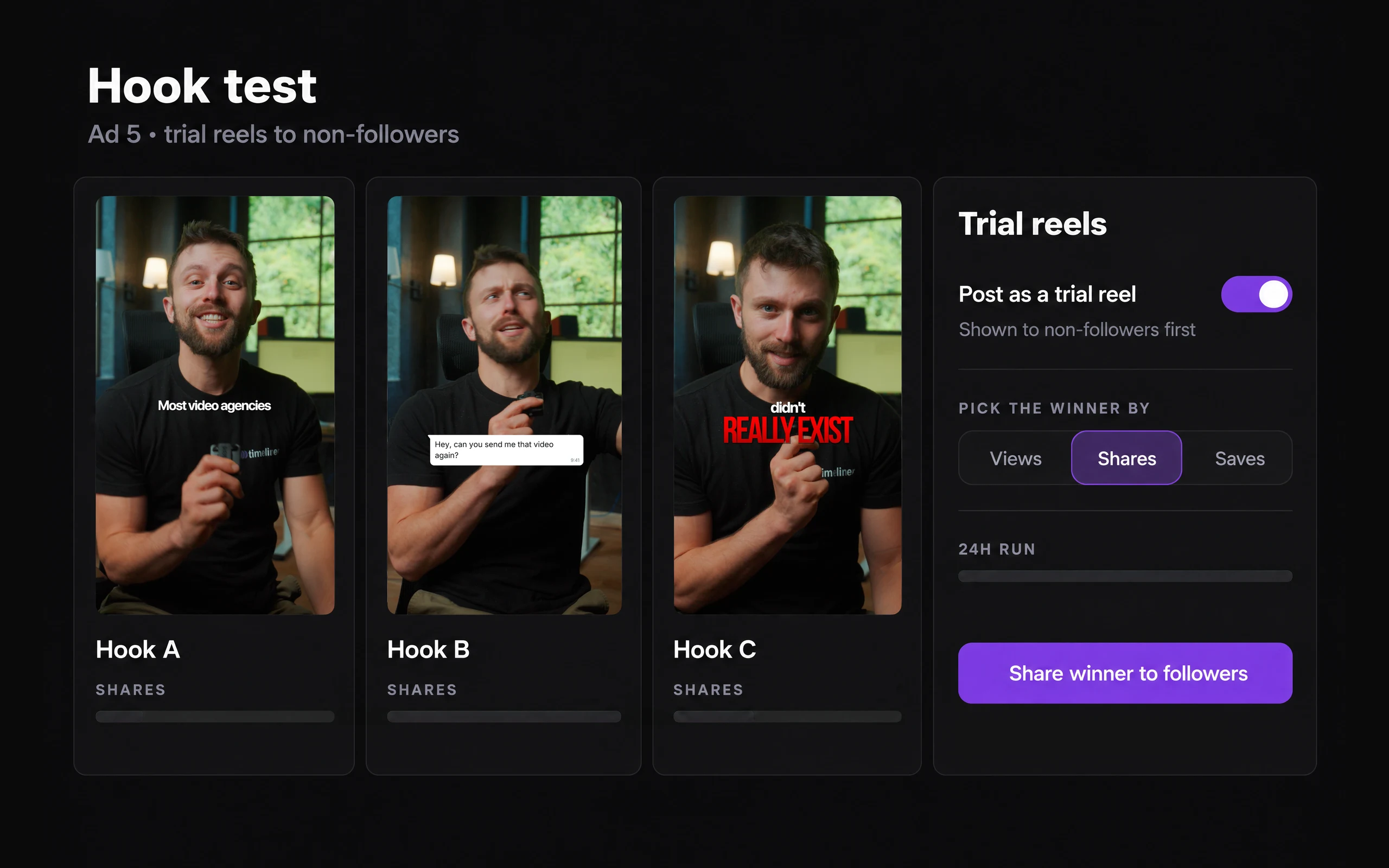
    Reels, feed posts, Stories and carousels of up to 10 slides. Collaborators, first comment, music from Instagram's library and Trial Reels.

  • Auto-publish

    Facebook

    Page posts, photo carousels and text posts. Facebook Reels and Stories are coming soon.

  • Auto-publish

    TikTok

    Post directly or send to TikTok drafts, choose who can view, set the disclosure toggles and pick the cover frame.

  • Auto-publish

    YouTube

    Shorts and long-form videos with title, tags, visibility, Made for kids and up to 3 thumbnails to choose from.

  • Auto-publish

    LinkedIn

    Personal profiles, with a first comment and document title. Company pages are coming soon.

  • Auto-publish

    X

    Posts of up to 280 characters with up to 4 photos or 1 video.

  • Coming soon

    Threads

    In early access with the Timeliner team while Meta reviews the app. Coming soon for every workspace.
Compose

Write it once, tune it per network

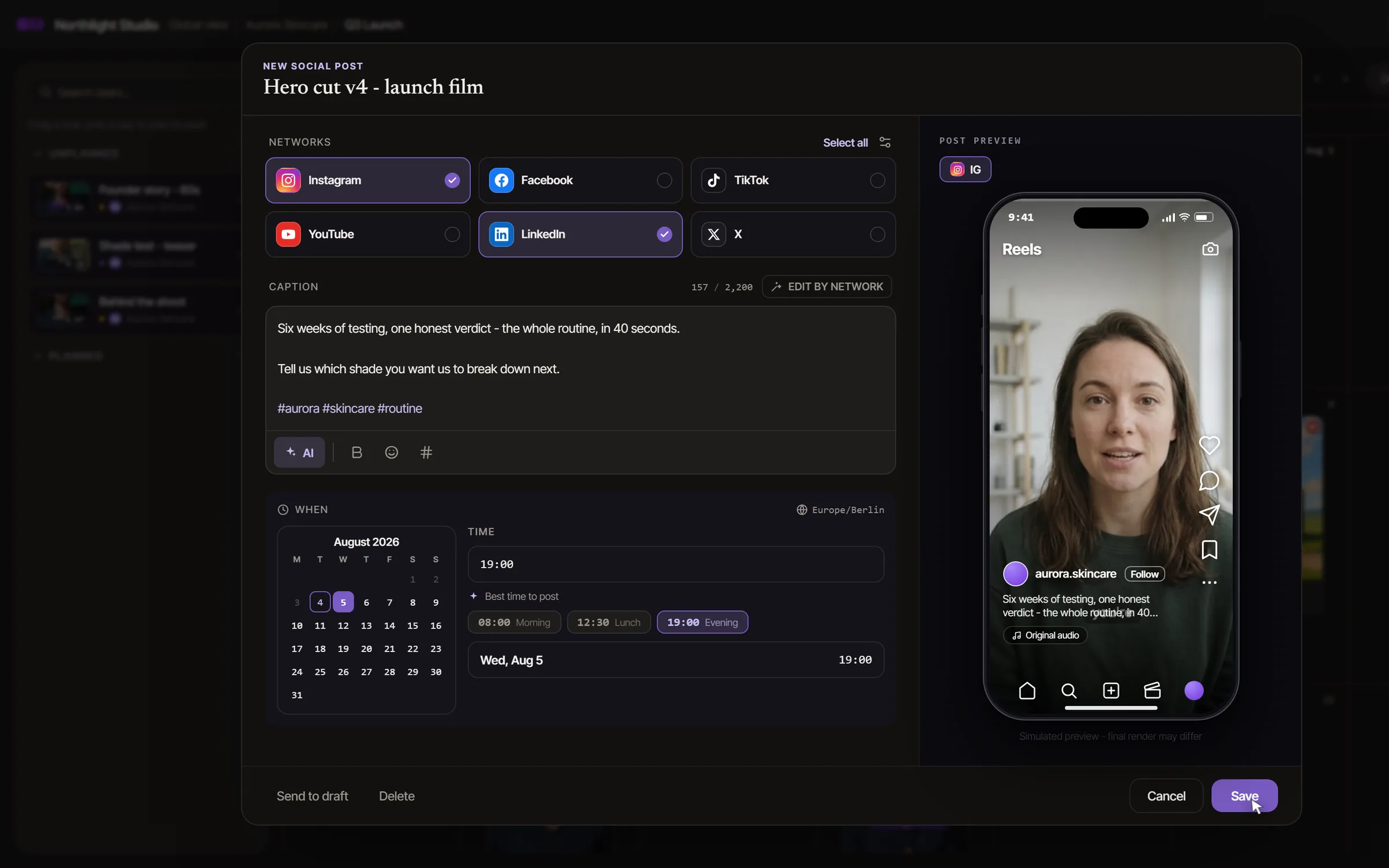
A shared caption with a tab for each network, the options each network really offers, and a live phone preview before anything is scheduled.

  • AI captions in the brand's voiceDrafted per network from the video's transcript, with YouTube titles and tags. It remembers the last corrections your team made.
  • Each network's own optionsInstagram collaborators, first comment, music and Story share. YouTube Shorts, visibility and thumbnails. TikTok drafts and who can view.
  • One post, several brandsDuplicate a post to up to 10 brands and change its networks for each one.
The post composer with Instagram and LinkedIn ticked among Instagram, Facebook, TikTok, YouTube, LinkedIn and X, a caption written and a posting time picked

Client sign-off

Nothing posts without the client's yes

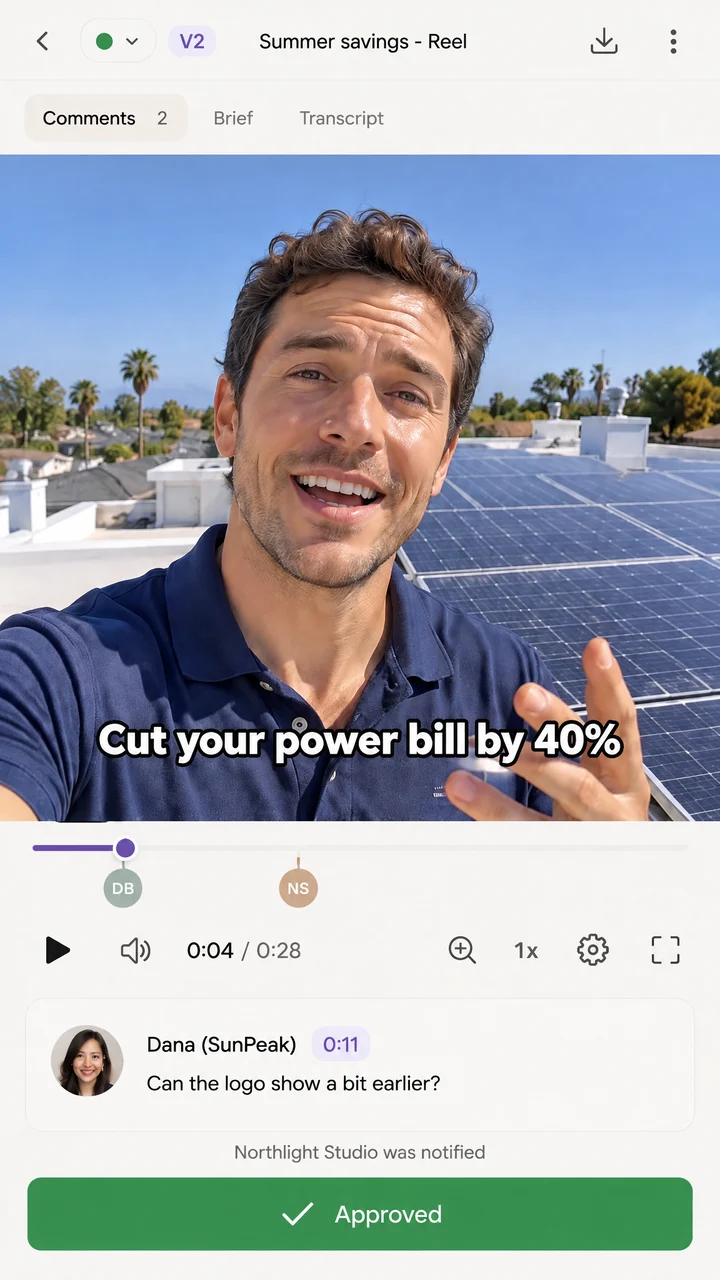
Clients approve the caption, the cover and the time from the same link they reviewed the video in. An unapproved post never goes out late.

  • Approve each network's captionClients see every network's caption and the cover, and can comment right on the image.
  • Held until approvedWith Only post approved videos on (the default), a post without approval is marked Not posted instead of publishing.
  • Your rules for clientsLet clients edit the post plan, and decide whether they may schedule approved posts themselves.
A deliverable marked approved in the client's portal on a phone

Calendar

A calendar for each brand, and one for all of them

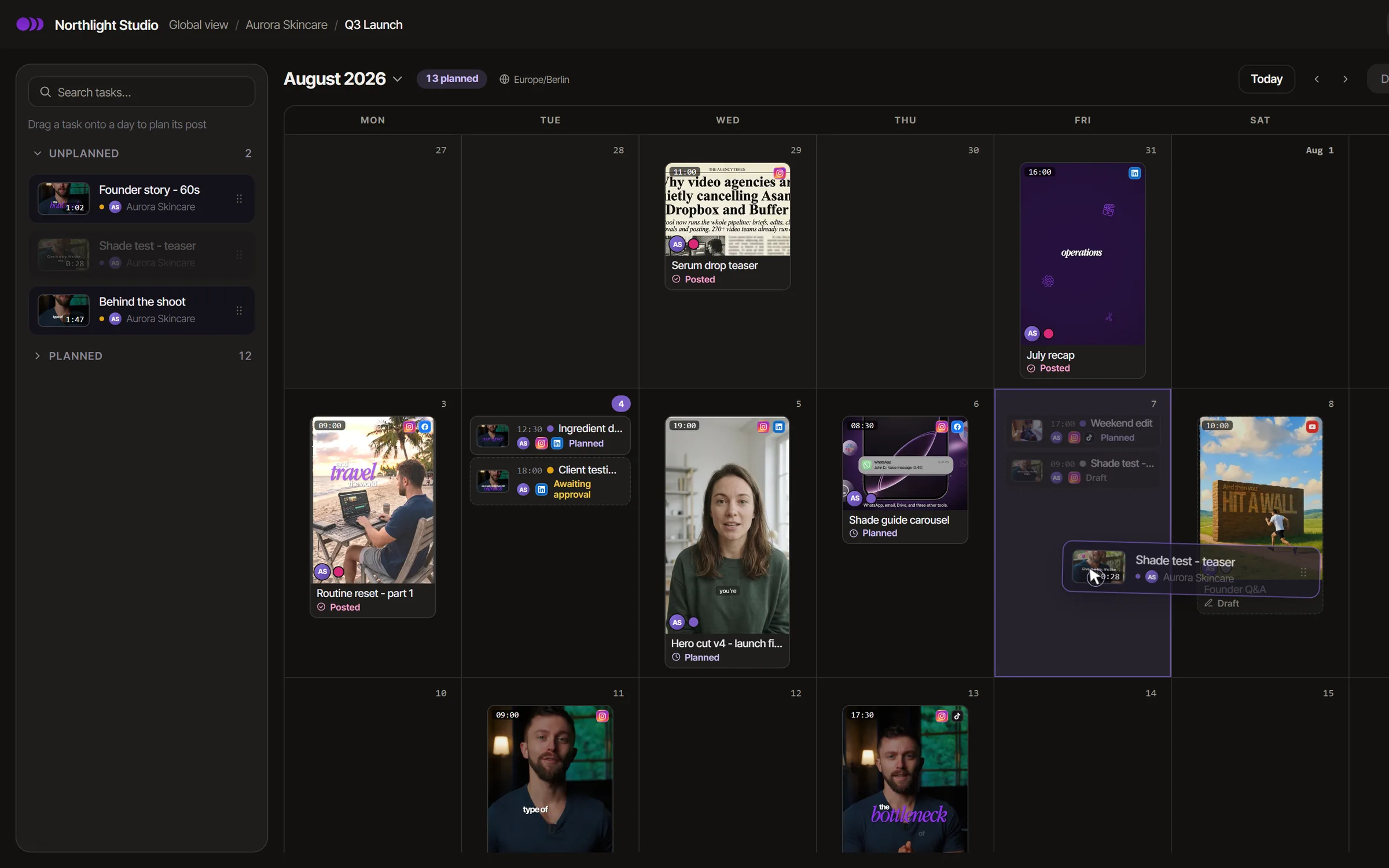
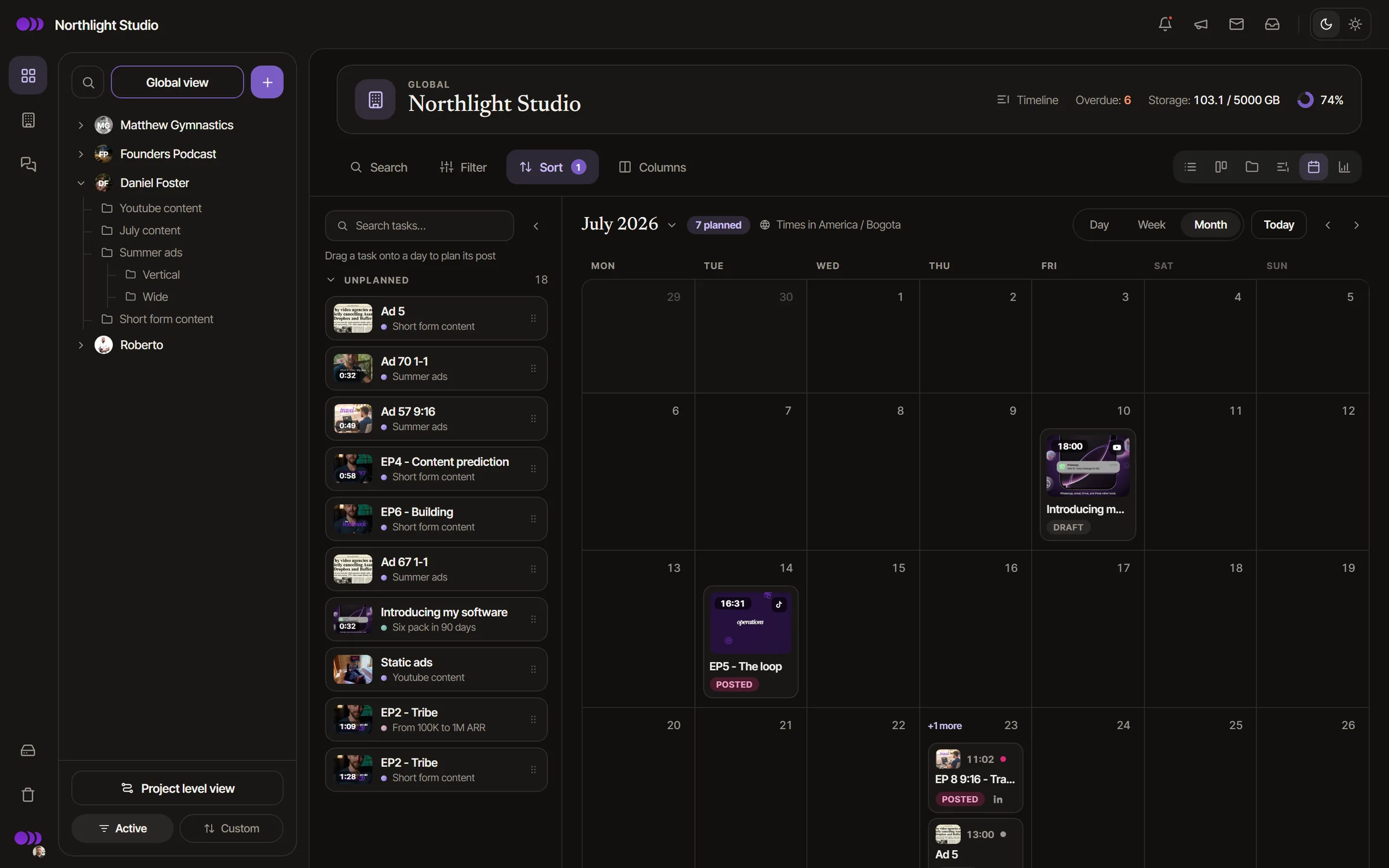
Plan one brand, one project or every client at once. Drag a video from the unplanned list onto a day and it is planned.

  • Day, week and monthDrag a planned post to a new day. Posted ones stay where they went live.
  • Every state at a glanceDraft, Planned, Awaiting approval, Posted, Not posted and Failed, on every pill.
  • Clients see their own calendarIn their portal, with planned and published posts. Nothing from other clients.
One brand's posting planner: unplanned videos on the left, the month's posts on the calendar marked Planned, Posted or Awaiting approval

Automations

Let the posting date run the schedule

Automations read the posting time. Set it or move it, and the work in front of it moves too.

  • Trigger on the posting timeA rule runs whenever a post's time is set or moved.
  • Deadlines counted back from go-liveBrief due 21 days before, edit due 7 days before. Offsets count back from the posting time and follow it when it moves.
  • Set the posting time for youA rule can set a task's posting time when it reaches the stage you choose.

Results

See what every post did, per brand

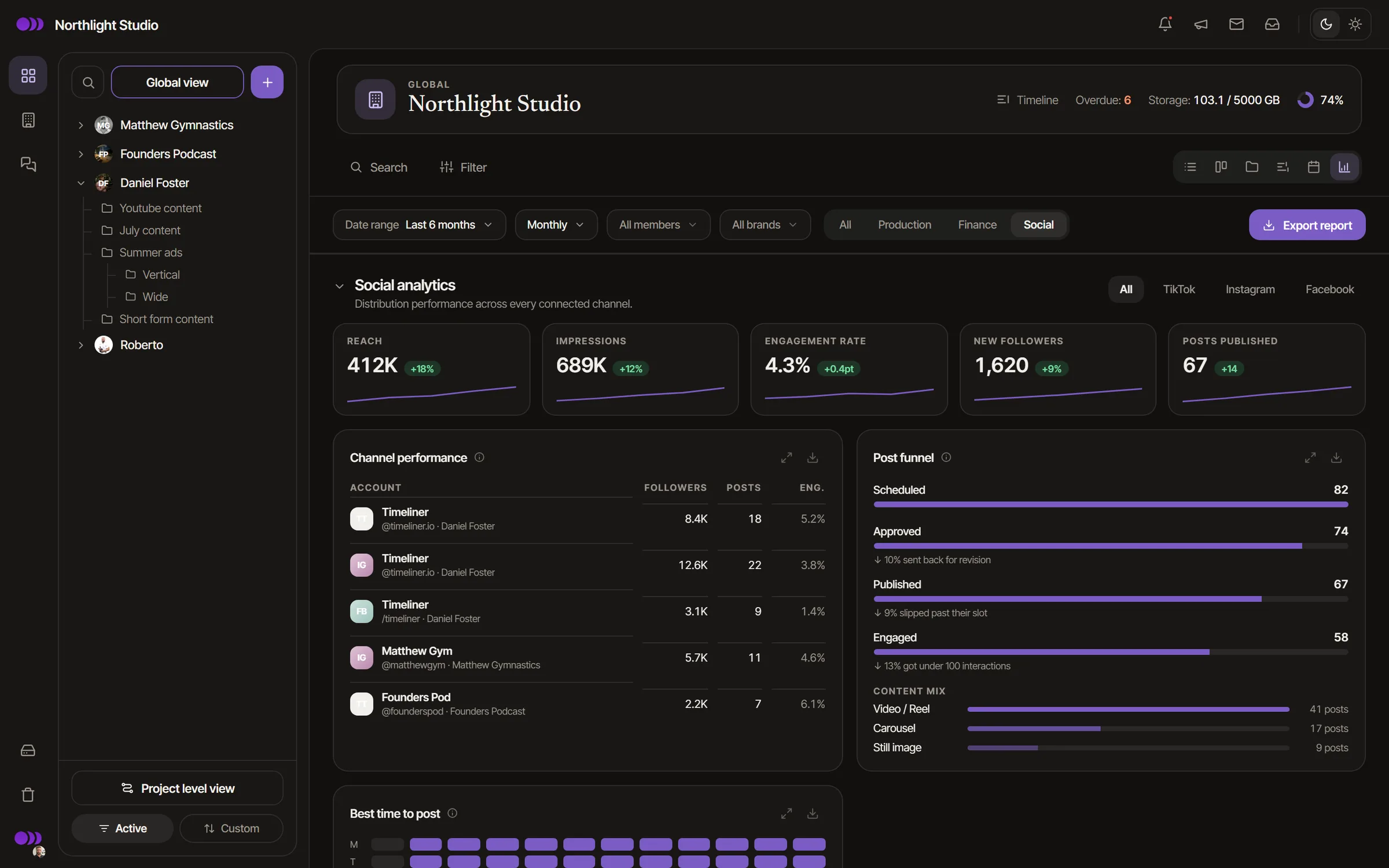
Views, engagement, shares and saves come back to Timeliner and sit beside the project the video came from.

  • Per post, per channel, per brandEngagement rate, audience growth and posts published, with PDF and CSV export.
  • Watch time where the network shares itYouTube and Instagram Reels report watch time, and account insights cover Instagram and Facebook.
  • Measured on Instagram, Facebook and YouTubeLinkedIn and TikTok analytics are coming.
Timeliner social analytics: views, engagement and followers per channel, and the best-performing posts

In practice

One approved Reel, live on three networks.

  1. The client approves the cut.From the link on their phone, where they left their notes.
  2. Write one caption.AI drafts it per network from the transcript, and you tweak the Instagram one.
  3. Pick the networks and the time.Instagram, TikTok and YouTube Shorts, Thursday at 18:00.
  4. The client signs off the post.Captions, cover and time, in the same link.
  5. It goes live on its own.From the brand's own accounts, and the numbers come back to the task.

From a customer

“I was really skeptical to use Timeliner. My team said it's 1,000 times better than Frame.io. Every morning I would spend an hour going through client folders without knowing what was completed. Now I look at it for 10, 15 minutes a day, make some comments, click one button and it goes back to the editors. Posting used to take an hour per client; with Timeliner I had two videos captioned and uploaded in two minutes. It saves me at least seven hours a week, and my clients love it.”
Joshua ShalamovFounder, SCALE Media (New York)

Read SCALE Media's story

Also included

  • Hashtag groups

    Saved per brand, up to 30 tags each, added in one click.

  • A cover per network

    Upload one or pick a frame from the video. TikTok takes a frame.

  • Live phone preview

    See the post the way each network will show it before you schedule.

  • Several accounts per network

    A caption tab for each account when a brand runs more than one.

  • Daily-limit warnings

    Timeliner warns when a brand reaches Instagram's 100 posts a day or TikTok's daily limit.

  • Reports to share

    Export a brand's post results as PDF or CSV for the client.

Security

Client work stays private.

How we protect your work
  • Encrypted at rest and in transit

    Files are encrypted with AES-256 at rest and travel over HTTPS.

  • Roles down to one project

    Team roles and client roles decide what each person can do, per brand or per project.

  • Share links you control

    Set a link to expire, add a passcode, or switch it off at any time.

  • Downloads after approval

    Decide whether a client can download a cut before they approve it.

  • Review watermarks

    Show your logo or a line like "For review only" over every preview.

  • Two-step sign-in

    Authenticator-app sign-in with backup codes, and you can require it for your whole team.

  • Activity log

    Approvals, uploads, share links and role changes are recorded in the workspace.

  • SOC 2 in progress

    Our SOC 2 program is under way. We are not certified yet, and we publish where the audit stands.

Frequently asked questions

More questions

Instagram, Facebook, TikTok, YouTube, LinkedIn and X publish automatically at the time you set. Facebook Reels and Stories, LinkedIn company pages and Threads are coming soon and already show in the composer as such.

Timeliner posts from the brand's own account through each network's official publishing API, the same way approved scheduling tools do, and it doesn't change the video, caption or cover the client approved. One thing to know: a sound you would add inside Instagram's app can't be attached by any scheduler, so Timeliner offers music from Instagram's library instead, or hands that post off for you to finish in the app.

Yes. Each brand connects its own accounts. You can send the client a branded link to connect them without ever sharing a password, and admins and supervisors manage the connections.

Not while Only post approved videos is on, which is the default. A post that reaches its time without approval is marked Not posted and never publishes late.

Each network publishes separately, so one failing never stops the others, and the team is notified. Timeliner retries on its own when a network asks it to slow down. If a network still refuses, pick a new time and save. Timeliner can't take down a post that is already live; do that in the network's app.

Each brand has its own calendar, and the global view shows every client together. The calendar is on the Agency plan and up. On Studio you publish for one connected brand from the post itself, without the calendar view.

Studio: one brand, one account per network. Agency: 10 brands (one more per extra seat) and two accounts per network. Scale and Enterprise: unlimited brands and five accounts per network.

Run your agency in one place.

Briefs, edits, approvals, posting and invoices in one place clients actually use.

No charge until day 15

Full walkthrough with Noam · 15 min